Chapters 6-8

Summary: Chapters 6-8 discussed how to develop a layout for a design and choose which colors and fonts to use.  Chapter 6 emphasizes using a grid when designing a layout for an organized and unified appearance.  Chapter 7 discussed the numerous decisions one must make when choosing a font style, size, or whether to italicize or bold words.  The chapter highlights Sans Serif as a good choice that made it easier to read.  Chapter 8 explains the importance of color in catching a reader’s attention and continuing the flow of what you are conveying.  Depending on the project, decisions about color can be based on one’s culture, history, or any inspiration found in nature.  This chapter also emphasizes that color can appear differently on screen versus in print, and one must take these differences into consideration when deciding on a color layout.

Example: Chapter 8 reminded me of the last Comm class I have taken.  I took Mass Media during my first semester at Trinity.  When learning about the final project assigned for our final, our professor emphasized the importance of using Sans Serif over other fonts.  I thought he was just being overly critical, but after reading this chapter I understand why he was putting such an emphasis on what font to use.  It is a subtle change, but it really does help the reader in a big way. This is especially true with presentations to large groups.

Connection: This experience with my professor has now been clarified after reading this chapter.  He was not being crazy, like I originally thought.  He was emphasizing the importance of font in presenting information to large groups of people.  Chapter 8 highlights Sans Serif since it is easier for your eyes to quickly read this font in comparison to fonts like Times New Roman and Arial.  When giving a presentation, you want your audience to focus on what you are saying as well as what your slides say.  He ended up giving me a nice tip that could help me in future presentations at Trinity.
Blog Post #3

Reading Summary

In chapters 6-8 of White Space is not your Enemy, the main topics include: proper usage of grids, creating layouts, and identifying type. The authors begin by stating what exactly a grid is and how to integrate grids into your work. Grids are necessary for giving complex or multiple page layouts a unified, cohesive structure. Grids should be thought of as framework that improve and aid in organizing the layout’s composition. Layout can be defined as the arrangement of visuals and type in a media text. Layouts are necessary to create proportion and form a focal point. Designing an effective layout will help create balance and guide the readers’ attention. Another important element of design is type. A well styled type sets the document’s tone and directly impacts readability and the visual hierarchy. Font is included in type therefore being well versed in font category, font parts, and best uses for specific fonts may help you achieve your visual communication objectives.

Outside Example

These chapters reminded me much of what I learned in my essential info technology course. We were taught that a key tip in recognizing amateur graphic design is the use of too many fonts. Using several competing fonts in a document can create confusion and clutter. This makes the document difficult to read and promotes disorganization rather than cohesion.

Reading Connection

What I learned in EIT directly relates to chapter 8 – Type. The authors stress the importance of creating a visually pleasing document with as little font types included as possible. Usually about 2 different fonts of the same category in one document is plenty. It is stated that “nothing screams amateur louder than using too many competing font styles.” Keeping a cohesive font style in your document helps organize and prevents a visual mess from happening.

Ch 4-5 WSINYE

Summary:

In White Space is Not Your Enemy chapter four, Hagen and Golombisky describe design flaws for amateur visual communicators or graphic designers. Whether it be a web page or a flyer, there are universal design flaws that can take away from what it is that you are trying to communicate. Hagen and Golombisky create a manageable list of 13 common errors people make when designing a layout. This list includes making sure photos have the correct proportions, creating borders when needed, clumping items together in an organized fashion, using the right font, and spacing everything correctly. Following these rules, clearly laid out, one can create a cohesive layout that doesn’t confuse the intended audience. Chapter five goes over the basic elements of how to compose eye-catching information in a way that does not take away from the message being conveyed. The first seven elements of design are pretty standard: space, line, shape, size, pattern, texture, value. One can manipulate all these elements to create a design that is fluid and easy to understand, while being engaging at the same time. An example of this is using horizontal lines to guide the eyes and create a good flow to the layout. Then, Hagen and Golombisky go into more depth on the seven principles of good design: focal point, contrast, balance, movement, rhythm, perspective, unity. These seven elements are a bit more abstract. One of the most important points is keeping balance. This can be done using radial balance (circular designs), symmetrical designs (when split the two sides are mirrored), and asymmetrical designs (that are often more visually stimulating). Incorporating all of these rules and principles will help facilitate the creating of a well rounded layout.

Personal example:

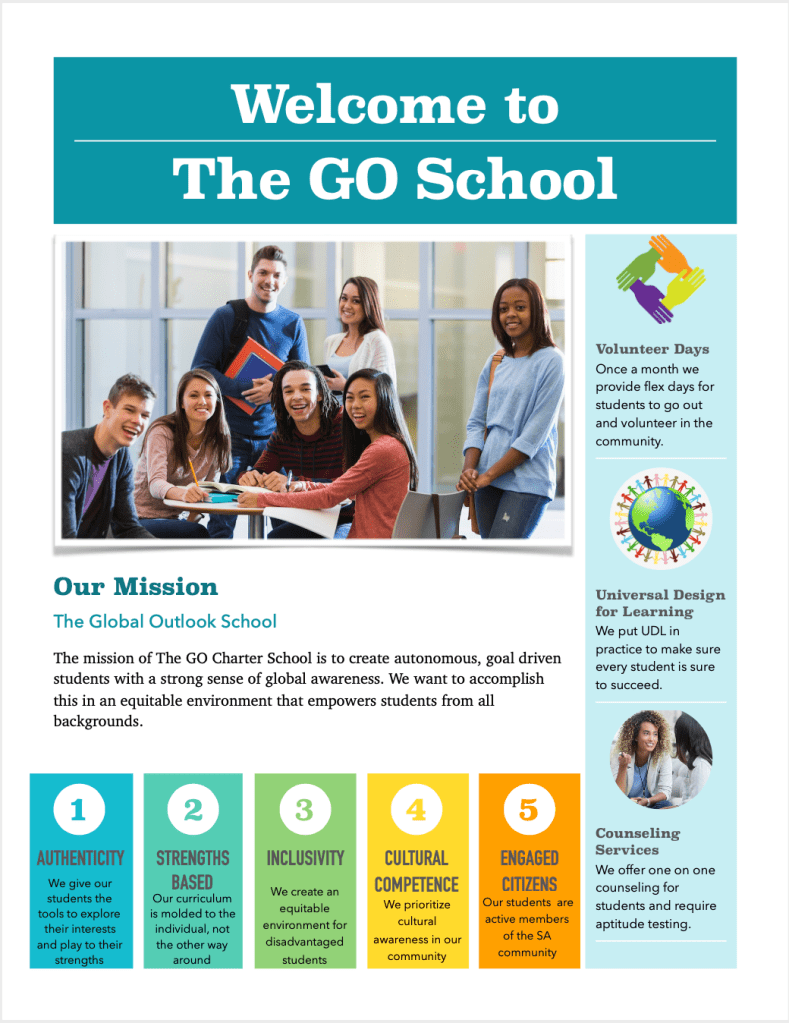
I had a hard time thinking of an outside example because I don’t often design web pages or ads. However, then I recalled that last semester I made a flyer to advertise for an imaginary school that I had designed. Taking into account that I had no personal experience with graphic design, I think I did a decent job of designing an eye catching layout, using many of the elements described in this reading. I think this was because my brain subconsciously understands what looks appealing and what is easiest to understand.

Connection to reading:

According to the reading, here I’ve done some good things and some bad things. I am going to focus on only a few key points from the reading to analyze my flyer. First of all, I definitely have one focus point which is the largest photo. It does have a border which is good, but it does not follow the hairline rule; it is a little bit chunky. None of my photos are warped, which is a big pet peeve of mine. I have mastered the art of clumping, creating little pockets of information as well as the use of negative space so that the page does not feel cluttered. However, there may be a little trapped negative space, but I don’t think it looks bad or distracting. I used value and contrast to avoid visual monotony to draw attention and keep things looking interesting. I definitely made the mistake of centering the information in the 5 boxes. I do believe I was sparing with using too many all capital letters. I added multiple different inorganic shapes. The layout doesn’t necessarily have an immediate flow to it, I think it needs more structure to guide the eyes. I believe it has rhythm with the 1,2,3,4,5 boxes and the pictures with information on the right side.

Chapters 4-5 WSINYE

READING SUMMARY

Chapter 4 of White Space is Not Your Enemy goes over the 13 amateur layout sins. Centering everything is not good, though it is often the go-to design. Warped or naked photos should also be avoided; photos need to be proportionate when resized and hairline borders should be used when photos have ambiguous edges (meaning an edge is the same color as the background). There should also be no more than two different fonts on one page/screen. Bulky borders and boxes are things to avoid as well; negative space is a better way to group and separate things, and if a border must be used, it should be a thin and understated one. Missing margins are also bad, so one should be generous with margins, including with inset and offset for text and picture boxes. Headlines should be kept straight (no stairstepping), and items that belong together should be clustered (clutter is bad). Negative space also needs to be pushed to the edges and not stay in the middle. Backgrounds should not be too busy and should be a good use of negative space. With tacky type emphasis, avoid reversing, stroking, using all caps, and underlining. Bullet points should be used for lists and lists need to be properly aligned. Breaks at the bottoms and tops of legs of type should also be avoided; these are called widows and orphans. Rivers of negative space that flow through legs of type should not be unsightly. These are the 13 amateur layout sins; on the other hand, the 5 steps to visual success are establishing a clear focal point, minimizing the number of groupings the eye needs to scan, guiding the eye with visual sightlines, setting type properly, and using simplicity and restraint. Chapter 5 goes over the 7 elements of design: space, line, shape and form, size and scale, color, texture, and value. These elements are all important in creating movement and flow in design. The 6 principles of design are focal point/emphasis (have one focal point), contrast, balance (radial, symmetrical, and asymmetrical), movement (good design controls eye flow), rhythm (uses pattern to create movement), and unity. The chapter also went over the 4 Gestalt Laws: proximity, similarity, continuity, and closure. Proximity refers to objects of the same group being close together, similarity is used to create order and organization, continuity adds direction and movement, and closure means that people can mentally fill gaps to complete a shape.

OUTSIDE EXAMPLE

Last semester, I took Essential Information Technology (EIT) for my digital literacy credit. We had to do a lot of graphic design work in EIT, which included learning the principles and elements of design. We made personal blogs and had to use these principles of design to make it visually pleasing. We were also tested on them and had to memorize the principles and elements of design. EIT consisted of a lot of design work, and we would put all of our work on our blogs as we followed the design elements and principles.
READING CONNECTIONChapters 4 and 5 of White Space is Not Your Enemy explained the 13 amatuer layout sins, the 5 steps to visual success, the 7 elements of design, the 6 principles of design, and the 4 Gestalt Laws. In EIT, we studied and used the 7 elements of design and the 6 principles of design. We had to memorize them and were tested on them, but we also had to create a blog in which we added all our work. On this blog, we had to use the elements and principles of design to create a readable and visually pleasing blog. When I read these two chapters of White Space is Not Your Enemy, I recognized the elements and principles of design from EIT last semester and already knew how to use them.

Messages, Signs, and Meanings

Reading Summary:

Semiotics is the science that answers the question: What does X mean? A sign is anything that stands for something other than itself. The thing that the sign refers to is known as the referent. There are two kinds of referents: a concrete referent, such as the animal designated by the word dog, and an abstract referent, such as a bright idea illustrated by a lightbulb. A dog can exist in the real world, while a bright idea is something that is intangible. The image that comes to mind when we see/hear a sign is called a concept. Research has shown that the meanings of most concepts are subject to personal interpretation and subjective feelings; it is not randomness, but a form of a socially based pattern. The connotations of many concepts are constrained by culture. An icon is a sign that stands for a referent through some form of replication, stimulation, imitation, or resemblance, such as a photo. An index is a sign that stands for a referent or to put referents in relation to each other, such as the pointing of the index finger. A symbol is a sign that stands for its object in a specific context, such as math symbols.

Outside Example:

This chapter reminded me of the debate in politics of what symbols stand for. After the Charleston Church shooting, people decided that the Confederate flag that used to fly over the state Capitol was no longer appropriate. Many say that the Confederate flag stands for southern culture, while others see at as an obvious symbol of racism and a way to reinforce white supremacy. Similarly, there was a controversy about a statue of Robert Lee in New Orleans. Some felt that the statue was honoring a war veteran for good strategy skills, while others saw it as honoring the Confederacy.

Connection to Reading:

The chapter talked about how most people view symbols a certain way based on what they are socially accustomed to. For example, the Confederate flag is often flown at Ole Miss, and many people don’t see it as offensive but as preserving southern culture. One of the reasons that this might be the case is due to the fact that the school is in the Deep South, and many of the students are from the South, meaning that they grew up viewing the flag as a part of Southern culture rather than a hateful symbol. However, in most other parts of the country (including the South), it would undoubtedly be considered a white supremacy symbol. This might be due to the reason that people have grown up viewing it as a white supremacy symbol and have no reason to think it would symbolize anything else due to the history of the flag.

Blog Post #3 for Monday’s reading on February 3, 2019

Reading Summary

In chapter 4 of White Space is Not Your Enemy, the 13 layout sins are discussed. These sins are things that hurt your layouts. Things that blink, warped photos, photos needing borders, bad borders, cheated margins, centering everything, and clutter are the first seven of the layout sins. Trapped negative space, busy backgrounds, tacky fonts mistakes, bad bullet points, widow and orphan words, justified rivers between words, are the last of the layout sins. All of these sins are things to avoid to improve your layout. The book goes into detail about why each of these sins are detrimental to your layout and the things you can do to avoid them. 

In chapter 5 of White Space is Not Your Enemy, the seven elements of design and the seven principles of good design. The seven elements of design are space, line, shape, size, pattern, texture, and value. These elements of design are easy and basic things that make your design look well thought out and spaced without actually doing the hard work because the elements are followed. Focal point, contrast, balance, movement, rhythm, perspective, and unity are the principles to good design. These both give you a way to describe the designs you see and you can create more effective visual messages. 

Source: Chapters 4-5 of Rebecca Hagen and Kim Golombisky (2016) White Space is Not Your Enemy. Waltham, MA: Focal Press.

Outside Example 

The first thing that popped into my head while reading the chapters was nike ads. Nike’s ads follow these concepts. Nike ads have always been iconic. Their simple check logo and their iconic text they use is something everyone can recognize. It’s a design that everyone can see and know that it is a Nike design. That is because their designs are good.

Image Sources: 

https://www.designyourway.net/blog/inspiration/35-nike-print-advertisements-that-boosted-the-companys-income/

Reading Connection

In the example photo I chose you can see how the fonts aren’t tacky. They are recognizable and embrace the space. The background isn’t overly cluttered and has a purpose behind them. If you were to go through the rules and sins of chapter 4 and 5 you would find that these ads are perfect examples for what the chapters are teaching. Until I read these chapters I consciously detected what makes design good and bad, but now I have the words for what makes them good. The problem with a bunch of designs is people try to add more, but this shows that simplicity and less is more when it comes to layout and design.

Layout and Text

Reading Summary

In chapters 6-8 of White Space is Not Your Enemy, it discusses how to create a layout for articles or advertisements on different mediums and how to choose the appropriate text for the information that is being conveyed. When formatting the layout it is good to use a grid that fits the size, or aspect ratio, of the medium in which the final product will be displayed. Columns of text should be comfortably readable and should not interrupt reading flow. Text should be from the same family of fonts and the same typeface. Bold and Italics should be used sparingly and should come from the family of fonts and not through a shortcut. Letterfonts can be used as the focal point, and colorful subheadings or column guides chould be used to make a lot of text seem more readable.

Reading Example

While reading this article, it made me think of logos or advertisements that people take pictures of because they have an unintentional second meaning that takes away from the original message. Some of these are logos for companies that look like something else. Others are advertisements with poor word choice or poorly chosen visuals. Sometimes a company or organization will try to use a unique way to display a phrase but lay it out so poorly that it is hard to understand or is just completely unreadable. Often times people will collect pictures of these bad logos or advertisement designes and compile them online to make fun of them.

Reading Connection

These logos for companies that have unintentual visuals in them and advertisements that are hard to read are examples of how to not use text or layout. These companies were too caught up in making it look unique that they did not think about the readability or the overall look. The image above is confusing because it interrupts reading flow making it difficult to initally understand what is trying to be said. Not taking into consideration how the font looks can also cause complications with how words look like they may be spelled rather than what they are actually saying.

Layout, Type and Color Basics

Chapter Summary

In chapters 6 through 8 of White Space is Not Your Enemy, Golombisky and Hagen outline the design basics of document layout, type and colors. They advise to begin with a grid to aid in organization and then explain the importance of components such as focal points, columns, aspect ratios, and additional visuals. Further they advise laying out information in a way that expresses importance, ordering them from greatest to least relevance, creating a hierarchy. When creating a single page with a number of topics, they advise to use a modular page design, similar to what newspapers make use of, and when laying out multiple pages, it is important to maintain unity, make type inviting and to provide navigational signs to help readers avoid getting lost. They then continue to advise on choosing type, including picking one font for titles and additional ones for body paragraphs, keeping your intended audience in mind when picking them and selecting size. Finally they addressed the importance of colors, how they create visual impact, acting in an eye-catching manner, as well as organizing and evoking emotion and they advise individuals to keep in mind the culture, history and nature associated with colors when selecting them.

Outside Connection

When reading this chapter I couldn’t help but think of the spreadsheet modeling course that I am enrolled in this semester. When I first think of excel, numbers and formulas are the first thing that pop into my head, but after several classes I realized the importance of the design and layout and how text and color can impact how someone views the spreadsheet. It is important that the spreadsheet is visually appealing as it aids the individual, helping them understand the information presented to them and allowing them to more easily explore the page.

Reading Connection

The excel spreadsheet is a pretty basic layout but follows some of the same concepts that are described in the chapter. Every spreadsheet is laid out in columns, to help display information, columns that can be expanded to display entire words rather than having them lay underneath adjacent columns. Additionally, it is easy to add charts and visual representations of the data, but is important to use colors and arrange them in ways that do not distract from the other information on the page, serving as focal points or just as additional visual representations.

Layout, Type and Color

Summary

Hagen and Golombisky in chapters 6-8 discuss three key components to creating a productive form of media; layout, type and color. The layout of an ad or flyer or any visual platform is integral to getting the attention of appropriate audiences. The layout is set up through a grid and strategically planned to execute the media’s goal. Type is another important part of media to gain attention of media users. Proper fonts, styles and placement of text allows readers to easily flow through text. Color scheme is part of the final touches of media. Color if properly used can complete the aesthetic of the media to catch attention of potential readers.

Example

When I was younger my dad worked for a large magazine company that would publish advertisements for local companies. I remember going to his office and looking through all the advertisements that they were creating. The company is called star-telegram and is now mostly all online. They still post online advertisements and news, all with specific layouts, types and fonts.

https://www.star-telegram.com/entertainment/living/indulge/

Connection

When I was young, looking at all of the advertisements in the magazines I remember the exact lines separating the different advertisements and fonts. Each page had different colors with different sizes of advertisements. This entire reading was about the placement of those aspects within media and I thought of my dad’s old job because that is what they did on a daily basis.

“Messages, signs, and meaning”

Summary: This article discusses the idea of semiotics as the significant factor to understanding meaning. It tells us that a sign is anything that stands for something other than itself and to what it refers to as the referent. It then discusses the process of taking that sign and referent and making it into a concept. To explore the topic of signification the article shows the looping pattern of the definitions to find meanings to different words. Signification is the relation of x=y as we use or interpret a sign. It then shows how culture plays a big role in connotative meanings. The article then goes into the three main types of signs: icons, indexes, and symbols. The idea of iconicity and credits human perception to show how we pick up on these signs to interpret them. It shows up in religion, childhood development, and social functions. The idea of indexicality credits not only human perception of patterns but of the cause and effect as well. The different meanings in symbolism are “established by social convention”. “Iconic, indexical, and symbolic modes of representation often converge in the creation of a sign or text”.

Personal Example: When reading about how the connotations of concepts and how they are “culturally constrained” with the figure of the scales of personality traits of president, it made me think about my own personality test. When I most recently took a personality test in class, we talked about how hidden biases might skew the results but also about the culture biases present. Typically, Americans view themselves more individually and don’t respond with their whole unit in mind whereas Japanese uphold strict values on community and often undermine some traits due to trying to remain uniform and unified.

Reading Connection: On page 13, it says “while the meanings of most concepts are subject to personal interpretation and subjective feelings, the range of variation is not simply a matter of randomness but forms a socially based pattern”. This shows how the Japanese throughout generations have built up this idea of being humble as well as suppressible and can be shown in a personality test. While Americans can still act this way, some concepts have varied interpretations based on how you might view the world; either as an individual or community. These culture specified meanings then translate to other parts of life like how those high standards put on people in the community show up in the education system and mental health discussions.

Design a site like this with WordPress.com
Get started